On this page
- Quick Checks Before You Try Anything Else
- Common Mirana Club App Problems at a Glance
- Fix 1: The App Will Not Open
- Fix 2: White Screen After Opening
- Fix 3: "App Not Installed" Error on Android
- Fix 4: Stuck on the Loading Screen
- Fix 5: Login Loop
- Fix 6: Deposit Page Not Loading
- When to Contact Customer Service
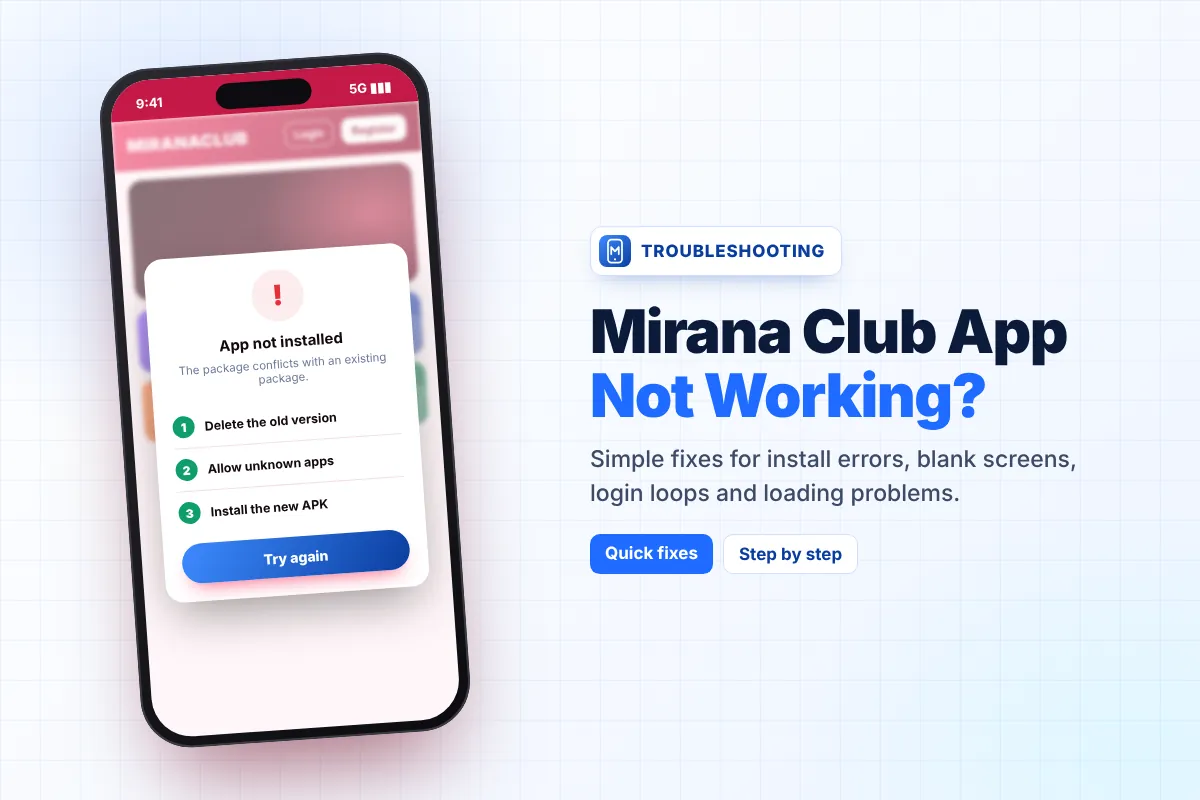
The Mirana Club app not working is one of the most common complaints from new players, but most problems have a simple cause: an old version, a weak connection, full storage or a phone setting that blocks the install. This guide lists the six problems people report most often and gives a clear fix for each one, so you can get back into your account in a few minutes.
Work through the fixes in order. Start with the quick checks, and only move to the bigger steps (like reinstalling) if the simple ones do not help. If nothing works, the last section explains when and how to contact Customer Service.
Quick Checks Before You Try Anything Else
Many "broken app" cases are solved by these four checks. They take less than two minutes:
- Switch your network. Move from mobile data to Wi-Fi, or the other way round. A slow or unstable signal is the number one reason the lobby keeps loading.
- Restart your phone. This clears stuck background processes and frees memory.
- Check free storage. Keep at least 500 MB free. The app itself is tiny, but your browser and system need space for cache.
- Check the date and time. Set them to "automatic". A wrong clock can break secure (HTTPS) connections and stop the app from loading.
If the problem is still there, find it in the table below and follow the matching fix.
Common Mirana Club App Problems at a Glance
| Problem | Most likely cause | Fastest fix |
|---|---|---|
| App will not open | Old version or corrupted cache | Clear cache, then update or reinstall |
| White or blank screen | Slow connection or blocked page content | Change network, turn off data saver, reopen |
| "App not installed" (APK) | Unknown apps blocked, old copy present, broken download | Allow install, remove old copy, download again |
| Stuck on loading | Weak signal, VPN, or full storage | Turn off VPN, free storage, restart |
| Login loop (keeps asking to log in) | Old saved session or blocked cookies | Log out fully, clear site data, log in again |
| Deposit page not loading | Payment page blocked or timed out | Disable pop-up blocker, retry on Wi-Fi, use another method |
Fix 1: The App Will Not Open
If you tap the icon and nothing happens, or the app closes straight away, the files on your phone are probably old or damaged.
- Force stop the app Open Settings, go to Apps, find Mirana Club and tap Force stop.
- Clear cache In the same screen, open Storage and tap Clear cache. Do not clear data yet.
- Open it again If it still fails, check for a newer version on our Mirana Club app update guide.
- Reinstall as a last step Uninstall, then install the latest copy from the Mirana Club app download page. Your balance is safe because it is stored in your account, not on the phone.
Fix 2: White Screen After Opening
A white or empty screen means the app opened but could not load the lobby. This is almost always a connection issue.
- Turn off Data Saver or Lite mode in your phone or browser settings.
- Turn off any ad blocker or VPN for a moment and reopen the app.
- If you use the Quick Install version, open the site once in your normal browser. If it loads there, remove the home-screen icon and add it again.
Fix 3: "App Not Installed" Error on Android
This message appears only with the Android APK. Android shows it when it cannot finish the install. Try these fixes one by one:
- Allow unknown apps Go to Settings, then Apps, then Special access, then Install unknown apps. Allow the browser you used to download the file.
- Remove the old copy If an older Mirana Club app is already on the phone, uninstall it first. Two copies with different signatures cannot sit side by side.
- Download the file again A download that stopped halfway gives a broken file. Delete it from your Downloads folder and download it again on a stable connection.
- Check your Android version The APK needs Android 5.0 or newer. On older phones, use the Quick Install option or play in the browser instead.
If Play Protect shows a warning, read it carefully. Only continue if you downloaded the file from the official Mirana Club download page. Never install a "modded" or "hacked" copy shared in groups.
Fix 4: Stuck on the Loading Screen
If the spinner never stops, the app is waiting for data that is not arriving. Close the app completely, wait ten seconds and open it again. If that fails, turn off your VPN, free some storage, and move closer to your Wi-Fi router. Peak evening hours can also be slower on mobile networks, so try again a little later before reinstalling.
Fix 5: Login Loop
In a login loop you enter your phone number and password, the app accepts them, and then sends you back to the login screen. An old saved session usually causes this.
- Log out everywhere If you are logged in on another phone or browser, log out there first.
- Clear site data For the Quick Install version, clear browsing data for the Mirana Club site in your browser settings. For the APK, use Clear storage in app settings.
- Log in once Enter your details slowly and do not tap the button twice. If you forgot your password, use the reset option explained in our Mirana Club app login guide.
Fix 6: Deposit Page Not Loading
The deposit screen often opens a payment page from a wallet or bank. If it stays blank or closes, your browser may be blocking it.
- Allow pop-ups for the Mirana Club site and try again.
- Switch to Wi-Fi, because payment pages time out quickly on weak data.
- Try a different method from the list (for example a bank transfer instead of a wallet). Our Mirana Club app payment methods page lists what players usually see in Pakistan, India and Myanmar.
- Do not pay twice. If money left your wallet but the balance did not update, wait 15–30 minutes and keep your transaction ID.
When to Contact Customer Service
Contact support inside the app if a fix above did not work, if money left your account but the balance did not change, or if your account shows an error message you do not understand. Use the Customer Service option inside the platform, not a number from social media.
To get a fast answer, send:
- Your registered phone number (never your password)
- The exact error message or a screenshot
- Your phone model and Android or iOS version
- For payment issues: amount, time, method and transaction ID
Real support staff will never ask for your password or your 6-digit reset code. Anyone who does is trying to steal your account.
Still Having Trouble?
Install a fresh copy of the latest version, then log in again. Most problems disappear after a clean install.
This is an independent guide and is not the official Mirana Club app. Play only if you are 18+ and it is allowed where you live.
Frequently Asked Questions
Why is my Mirana Club app not opening?
Usually the app files are old or the cache is damaged. Force stop the app, clear its cache and open it again. If it still fails, uninstall it and install the latest version from the official download page.
Will I lose my balance if I reinstall the Mirana Club app?
No. Your balance, bonuses and history are saved in your account on the platform, not on your phone. After reinstalling, log in with the same phone number and password.
How do I fix the "App not installed" error?
Allow your browser to install unknown apps, uninstall any older Mirana Club copy, and download the APK again on a stable connection. The APK needs Android 5.0 or newer.
Why does the Mirana Club app keep asking me to log in?
An old saved session is the usual cause. Log out on other devices, clear the app or site data, and then log in once with your correct details.
What should I do if money left my wallet but did not reach my balance?
Do not pay again. Wait 15–30 minutes, then contact Customer Service inside the app with the amount, time, payment method and transaction ID.