
On this page
You can create a Mirana Club app account directly inside the app in about two minutes. There is no form to print and no document to upload at the start. All you need is a working phone number, an email address you can open, and a password you will remember. This page walks you through the sign-up screen inside the app, explains the country code for Pakistan, India and Myanmar, and shows what to do right after your account is ready.
Remember that Mirana Club is a real-money platform for adults. You must be 18 or older, and you should check the rules for online gaming where you live before you deposit.
Before You Start: Three Things to Keep Ready
Your phone number
This becomes your username. You will type it every time you log in.
A strong password
At least 8 characters with letters and numbers. Write it somewhere safe offline.
An email you can open
Password resets are sent here as a 6-digit code, so it must be real and active.
If the app is not on your phone yet, install it first with our Mirana Club app download guide. iPhone users can follow the Mirana Club app for iPhone steps.
Sign-Up Steps Inside the Mirana Club App
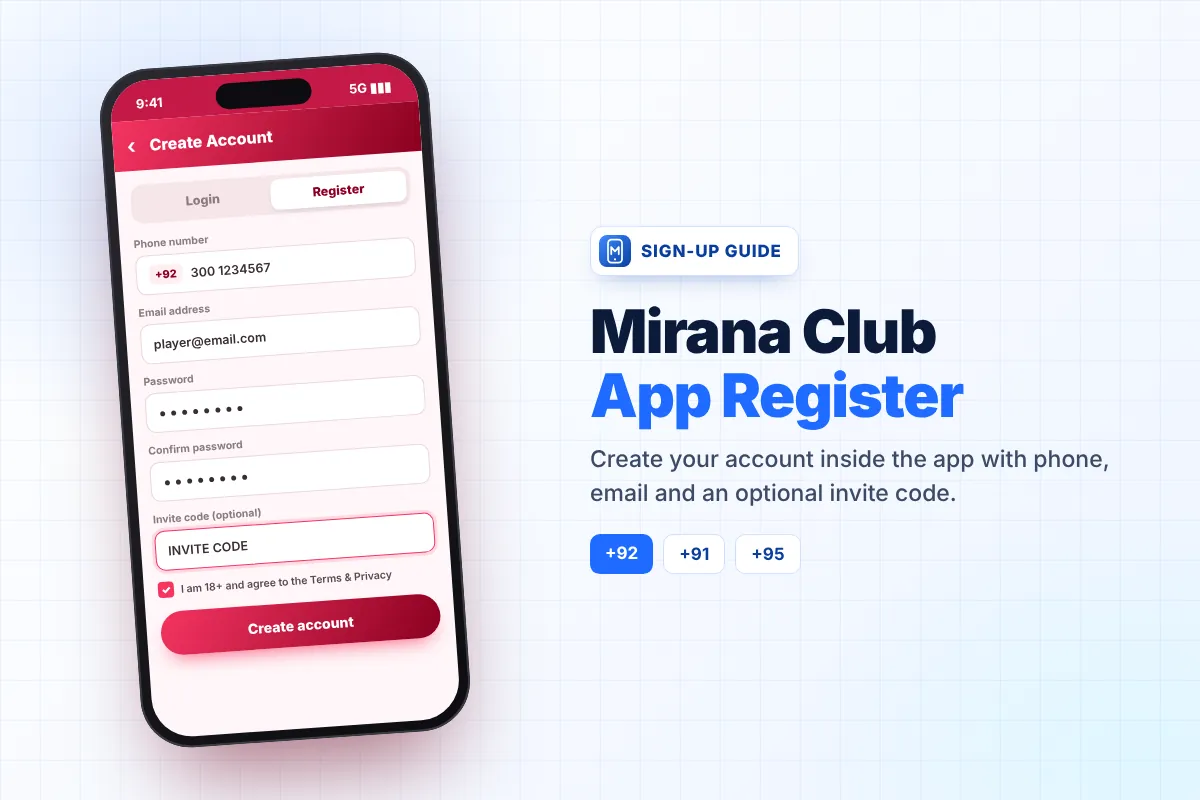
- Open the app and tap Register The button is in the top bar. The screen switches to the sign-up form.
- Choose your country code Tap the flag next to the phone field and select your country.
- Enter your phone number Type the number without the first zero (see the table below).
- Add your email address Double-check the spelling, because a typo here makes password recovery impossible.
- Create and confirm your password Type the same password in both boxes.
- Invite code (optional) If you have a code, enter it now. Our code is coming soon.
- Confirm you are 18+ Tick the box that says you are an adult and agree to the Terms and Privacy policy.
- Tap Create account You are signed in straight away and land on the app home screen.
Phone Number Format for Pakistan, India and Myanmar
The most common sign-up mistake is typing the number with the local zero after the country code is already selected. The app adds the country code for you, so you only type the rest.
| Country | Code to select | Local number | What you type |
|---|---|---|---|
| Pakistan | +92 | 0301 2345678 | 3012345678 |
| India | +91 | 098765 43210 | 9876543210 |
| Myanmar | +95 | 09 123 456 789 | 9123456789 |
The numbers above are examples only. Use your own number, and keep using the same one each time you log in.
Why the Email Address Matters
Your email is not used for spam. It is the only way to recover your account if you forget the password. When you tap "Forgot password?", the app sends a 6-digit code to this email, and the code works for 10 minutes. If the email is wrong or you no longer have access to it, recovering the account becomes very difficult.
Use an email you check regularly, such as your main Gmail address, and make sure you can open it on the same phone.
Using an Invite Code
The invite code box is optional. You can leave it empty and still create a normal account. If you do enter a code, it links your new account to the person or website that invited you, which is how the referral program works. You can use our code: coming soon.
Add the code while you register. The sign-up form is where the invite code box appears, so it is easiest to enter it at this step. To learn how referrals and rewards work, read our Mirana Club app referral program guide.
What to Do Right After Signing Up
- Explore in Demo mode Try a few games without real money so you understand how each one works.
- Open the Activity page See the current first deposit bonus, daily check-in and gift-code offers, along with their rules.
- Read the turnover rule Bonuses usually add a wagering requirement before the balance can be withdrawn.
- Make a small first deposit If you decide to play, start small. The first deposit bonus starts from Rs300 at the time of writing.
- Set your own budget Decide how much you can afford to lose before you play, and stick to it.
Our Mirana Club app payment methods page explains deposits and withdrawals for each country.
Registering on a Tablet or Computer
The sign-up form looks the same on a tablet or a laptop browser. The steps do not change: choose the country code, type your number, add your email and password, and tick the 18+ box. Once the account exists, you can log in on any device with the same details. Many players register on a phone and then also play on a bigger screen, which is explained in our Mirana Club app for PC guide.
Sign-Up Mistakes to Avoid
- Typing the leading zero after the country code is already selected.
- Using a fake or old email that you cannot open later.
- Choosing a password you use elsewhere, such as your email or Facebook password.
- Creating several accounts to collect bonuses again, which can break platform rules.
- Letting someone else register for you and keep your password, especially people offering "VIP accounts" in chat groups.
Create your Mirana Club account
Open the app, tap Register and use invite code coming soon if you want to join through our referral.
Frequently Asked Questions
How long does it take to register in the Mirana Club app?
About two minutes. You enter your phone number, email and password, tick the 18+ box and tap Create account.
Do I need an ID card to create an account?
No documents are needed to start. You only need a phone number, an email address and a password.
Should I type the 0 at the start of my number?
No. Select your country code (+92, +91 or +95) and type the number without the first zero.
Is the invite code required?
No, it is optional. You can leave the box empty, or enter our code coming soon to join through our referral.
What happens if I enter the wrong email?
You may not be able to reset your password later, because the 6-digit reset code is sent to that email. Always double-check it before tapping Create account.
Can someone under 18 use the Mirana Club app?
No. The platform is for adults only, and you must confirm you are 18 or older during sign-up.